AI coding tool ROI measures the return on investment from tools like GitHub Copilot, Claude Code, Cursor, and similar AI assistants. It compares the cost of these tools against the productivity gains, quality improvements, or capacity increases they enable.
The problem is that almost nobody measures this well.
According to Gartner, only about 5% of companies currently use software engineering intelligence tools, though this is expected to grow to 70% in coming years. This means most teams are trying to measure the impact of AI tools without first understanding their "normal" productivity patterns.
You can't measure improvement without a baseline. And you can't demonstrate ROI without measuring improvement.
Here's how to do both.
#The Measurement Crisis
29.6% of organizations don't measure AI tool success at all. Most teams track adoption anecdotally, while a handful correlate AI usage with metrics like deployment frequency, bug rate, and cycle time.
This measurement gap creates several problems:
Budget justification: When CFOs ask "what are we getting for the $50K we spend on Copilot licenses?", engineering leaders can only say "the developers like it."
Optimization: Without measurement, you can't identify which teams or use cases benefit most, which means you can't focus investment effectively.
Vendor decisions: Choosing between Copilot, Claude Code, Cursor, and alternatives becomes guesswork without data on relative impact.
Scaling decisions: You can't know whether to expand AI tool access or limit it without understanding current ROI.
The organizations that figure out AI ROI measurement will make better decisions than those flying blind.
#Establishing a Baseline
Before you can measure AI impact, you need to know what "normal" looks like.
#Capture Pre-AI Metrics
If you're adopting AI tools for the first time or expanding to new teams, capture baseline metrics first:
Cycle time: How long from first commit to production for typical changes
PR throughput: PRs merged per developer per week
PR size: Lines changed per PR (will be important for quality analysis later)
Code review time: Hours from PR opened to review completed
Build success rate: Percentage of CI builds that pass
Rework rate: Percentage of PRs requiring significant revision after review
Defect rate: Bugs found in production per deployment or per time period
Capture at least 4-6 weeks of baseline data before measuring AI impact. Less than that and your baseline is too noisy.
#Account for Seasonality
Engineering productivity varies. Q4 has holidays. Q1 has planning disruption. Summer has vacations.
Compare AI-period metrics to the same period the previous year if possible. Or adjust for known seasonal factors.
#Segment by Team and Role
Different teams will see different impacts. Backend engineers doing CRUD operations might see large gains. Security engineers dealing with novel attack vectors might see minimal benefit.
Segment baseline data by team, project type, and engineer experience level. Aggregate ROI numbers hide whether AI is helping some groups more than others.
#Measuring Adoption: Which Pull Requests Did AI Write?
ROI depends on adoption — unused licenses have zero return — and every quality comparison later in this framework needs you to separate AI-assisted work from the rest. So the first measurement question is the simplest one to ask: how much is the team actually using these tools?
It is not a simple question to answer.
#Why Vendor Usage APIs Fall Short
The obvious route is to integrate with each tool's own analytics. We tried that first when building this into Coderbuds, and the picture was uneven:
- Claude Code had the best API we found: clean endpoints and usage by user and timeframe — sessions, lines generated, acceptance rates.
- Cursor required an Enterprise account to reach its API at all, which rules it out for many teams.
- GitHub Copilot has a workable API, though it is built more for admin controls than detailed usage analytics.
- OpenAI's API reports token usage, with nothing connecting it to a person or the work it went into.
Then there is attribution. Developers sign up to different services with different email addresses — [email protected] on GitHub, [email protected] on the AI tool. You can build an email-mapping layer to join them, and we built most of one before stopping to ask what it would actually tell us.
"Sarah used Claude Code for 15 hours this month and generated 2,000 lines" says nothing on its own. Did those lines ship? Were they any good? Did they solve a real problem or introduce a bug?
#Count Pull Requests, Not Sessions
Engineering teams already have a source of truth for code changes: the pull request. Every meaningful change goes through one. It is reviewed, tested, merged and deployed, attributed to a developer, and linked to the work it delivers. So the useful question is not "how many hours of AI did we use?" but "which pull requests were made with AI assistance?" — and that one is answerable.
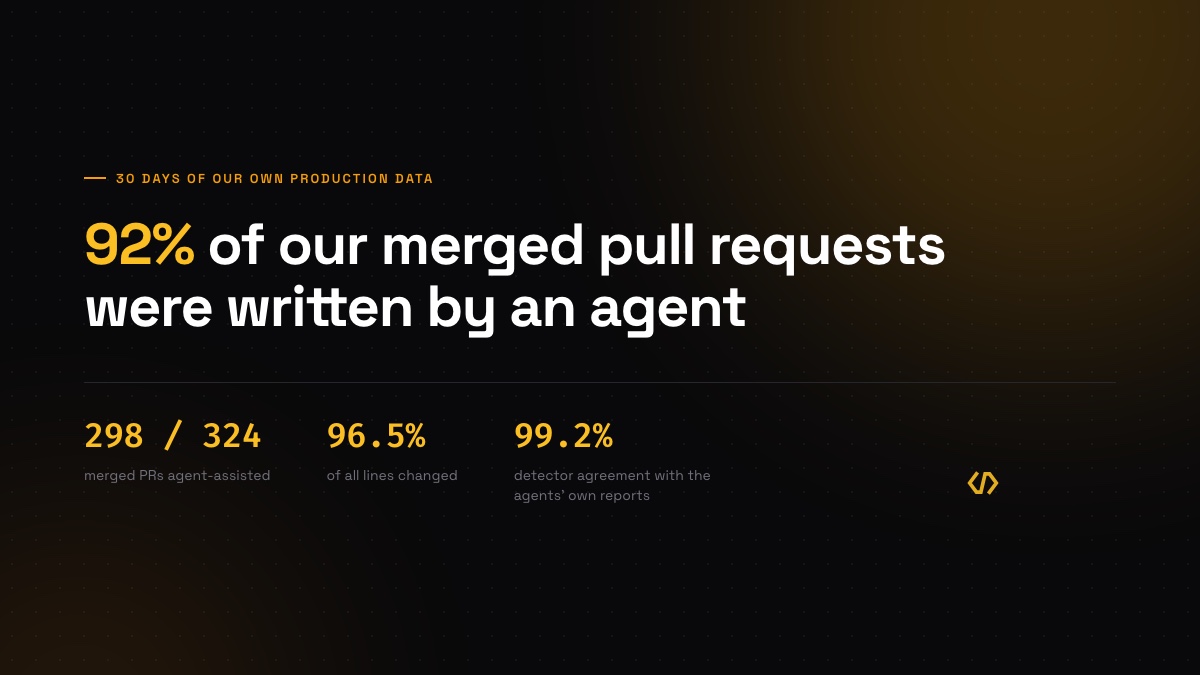
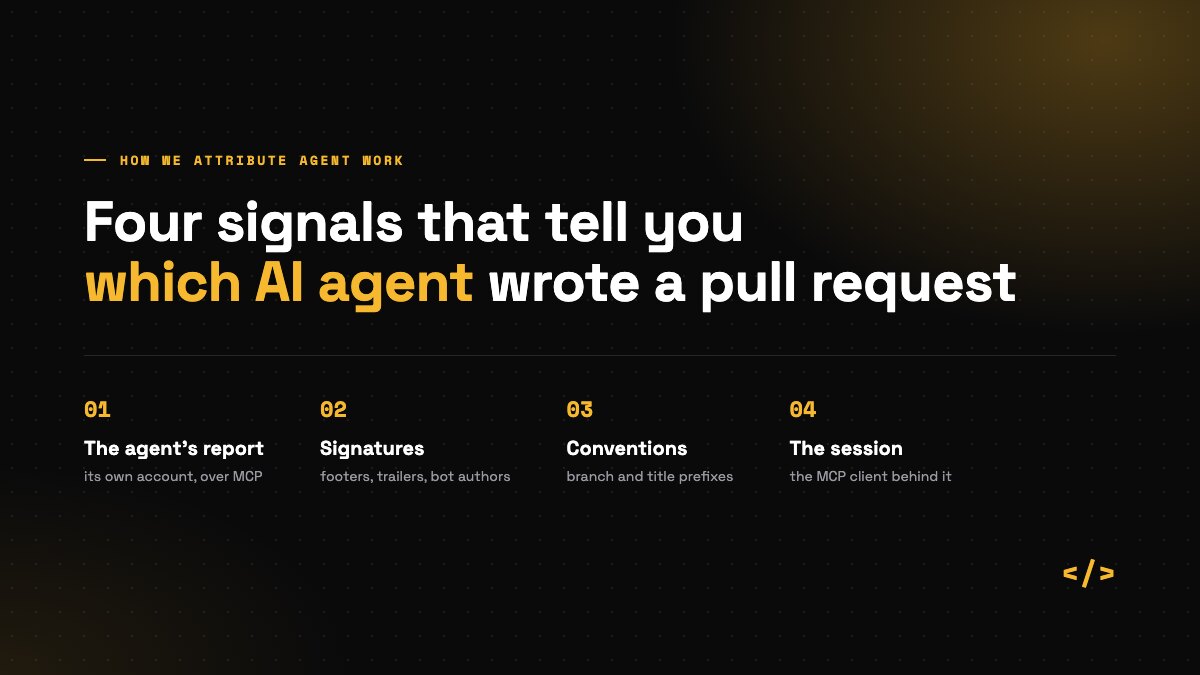
Detection works best in layers. Explicit evidence comes first: commits authored by an agent's bot account, the footers and Co-Authored-By trailers tools like Claude Code and Copilot add, branch-name conventions such as codex/ or cursor-, labels, and — strongest of all — an agent reporting its own work. Where none of that is present, weaker inference from commit and description patterns can fill some of the gap, as long as it is conservative and treats well-written commits as evidence of nothing. We describe the four signals we use and what is not evidence separately, and the rules themselves are open source.
Measuring at the pull request has two practical advantages over vendor APIs. It covers every tool at once, so you are not blind to whichever one your team adopted last. And because pull requests already have history, you can run detection retrospectively — which means you can reconstruct the pre-AI baseline described above from data you already hold, instead of waiting weeks for a new integration to accumulate it.
Imperfect detection across every tool is more useful than a perfect integration with one tool that only 30% of the team uses.
#The Adoption Metrics
Adoption rate: What percentage of active developers have AI-assisted pull requests? This tells you whether AI is spreading across the team or being carried by a few early adopters.
AI-assisted PR rate: What percentage of merged pull requests involved AI? A team can have 80% adoption and only 20% of pull requests assisted — occasional use, not deep integration into how work gets done.
Tool breakdown: Which tools are showing up? Useful when deciding what to license, or whether the team has standardised. Be honest with yourself about whether it changes any decision; often it is interesting rather than actionable.
Use case distribution: What do developers use AI for — generation, tests, documentation, understanding unfamiliar code? This one usually needs a survey or conversation rather than detection.
Adoption metrics help you tell whether low ROI reflects the tools or the barriers to using them.
#Key Metrics for AI ROI
#Primary Productivity Metrics
PR throughput change: Compare PRs merged per developer per week, before and after AI adoption.
Jellyfish data shows a 113% increase in merged PRs per engineer for teams moving to 100% AI adoption. That's a dramatic claim. Your results will vary. The key is measuring your change, not assuming industry averages apply.
Cycle time change: Compare time from commit to deployment, before and after.
Some studies show median cycle time reduced by 24%, from 16.7 hours to 12.7 hours. Again, measure your own change.
Time on tasks: For specific task types (tests, documentation, boilerplate), measure time spent before and after AI. This requires time tracking or estimation, which is imperfect but useful.
#Quality Metrics
AI tools can boost quantity while hurting quality. Measure both.
Code review feedback: Are reviewers catching more issues in AI-assisted PRs? Track review comment density and types of issues flagged.
Rework rate: Do AI-assisted PRs require more revision after initial review? Higher rework suggests the AI output needs more human refinement.
Build failure rate: Does AI-assisted code fail CI more often? This captures issues that automated checks catch.
Production defects: Do AI-assisted changes cause more production incidents? This is the ultimate quality metric but requires time to accumulate data.
Code duplication: Code duplication is up 4x with AI in some organizations. Track duplication metrics to catch this.
#The Contrary Data Problem
Not all AI productivity research shows gains.
A randomized controlled trial by METR found that when experienced developers use AI tools on complex tasks, they actually took 19% longer than without. After the study, developers estimated they were sped up by 20% on average.
That's a 39-percentage-point gap between perceived and actual impact.
This doesn't mean AI tools don't help. It means:
Context matters: AI might help significantly on some tasks and hurt on others. Aggregate measurement might miss this.
Experience matters: Senior developers working in familiar codebases might benefit less than juniors or anyone working with unfamiliar code.
Task type matters: Routine tasks with clear patterns probably benefit more than novel problems requiring deep reasoning.
Perception is unreliable: Developer self-reports of AI productivity gain are not trustworthy measures. Use objective metrics.
#Calculating ROI
#Basic ROI Formula
ROI = (Gain from Investment - Cost of Investment) / Cost of Investment
For AI tools:
Cost of Investment = License costs + Implementation time + Training time + Ongoing management
Gain from Investment = (Productivity increase x Developer cost) + Quality improvements - New costs (review overhead, technical debt)
#Example Calculation
Team of 20 developers. Average fully-loaded cost $200K/year per developer.
Costs:
- Copilot licenses: $19/month x 20 developers x 12 months = $4,560
- Training and rollout: 4 hours per developer x 20 x $100/hr = $8,000
- Total cost: $12,560
Gains (assuming 10% productivity improvement):
- 20 developers x $200K x 10% = $400K equivalent productivity
- But: 5% of that lost to code review overhead = $20K
- But: 3% technical debt increase = $12K future cost
- Net gain: $368K
ROI: ($368K - $12.5K) / $12.5K = 2,844%
That looks amazing. But it depends entirely on the 10% productivity assumption. If actual productivity improvement is 2%, ROI drops to ~500%. If there's no improvement, ROI is negative.
The calculation is only as good as your measurement.
#Conservative Assumptions
When projecting ROI for budget requests, use conservative assumptions:
- Productivity gain: Use the lower end of your measured range
- Quality impact: Account for review overhead and potential debt
- Adoption: Don't assume 100% adoption; use actual rates
- Timeframe: Gains may be lower initially as developers learn
It's better to exceed conservative projections than to miss aggressive ones.
#Measuring at Different Levels
#Team Level
Team-level measurement is the most practical starting point.
Compare a team's metrics before and after AI adoption, or compare teams with different adoption levels. Control for as many variables as possible (project complexity, team stability, seasonal factors).
Team-level measurement answers: "Is this team more productive with AI tools?"
#Organization Level
Organization-level measurement aggregates across teams.
This is useful for budget decisions and vendor negotiations. It answers: "Is our organization getting value from AI tool investment?"
The risk is that aggregate numbers hide variation. Some teams might have 50% productivity gains while others have none. Organization-level ROI could look positive while many teams see no benefit.
#Individual Level
Individual-level measurement is possible but sensitive.
Comparing individual productivity with and without AI can inform training and support decisions. But it can also create pressure and gaming.
If you measure at the individual level, use it for support, not judgment. Help struggling users adopt better, don't penalize them for lower AI-assisted productivity.
Two things are better left unmeasured. An individual "AI usage score" turns adoption tracking into surveillance and tells you nothing a team-level trend does not. And a head-to-head of AI-written versus human-written code quality has too many variables to mean much: a strong developer using AI will out-write a junior developer without it, and the comparison says more about the people than the tools.
#What to Watch Out For
#Activity vs. Value
More PRs doesn't mean more value. If AI enables faster production of code, but that code doesn't serve customer needs, productivity gain is illusory.
Where possible, connect productivity metrics to value metrics: features shipped, customer problems solved, revenue generated.
#Short-term vs. Long-term
AI tools might boost short-term productivity while creating long-term problems.
Code duplication increases maintenance burden over time. Developers who rely heavily on AI might not develop deep understanding. Technical debt might accumulate faster.
Measure both immediate productivity and lagging indicators of codebase health.
#Attribution Challenges
If productivity improved 20%, how much was AI tools and how much was other factors?
Many things change simultaneously: new hires join, processes improve, projects shift. Isolating AI's specific contribution is hard.
A/B testing (some teams have AI access, some don't) provides cleaner attribution but may not be politically feasible.
Without A/B testing, acknowledge that your ROI measurement includes some attribution uncertainty.
#The Perception Gap
Developers believe AI helps more than objective measurement shows. This isn't lying; it's genuine perception.
AI assistance feels helpful. It reduces frustration, provides suggestions, speeds up tedious tasks. The subjective experience is positive even when objective productivity gains are modest.
For ROI purposes, rely on objective metrics. For adoption decisions, consider both objective metrics and developer experience. A tool developers love using has value beyond productivity, including morale and retention.
#Building an AI ROI Program
#Phase 1: Baseline (4-6 weeks)
Before expanding AI tool access:
- Capture cycle time, PR throughput, review time, defect rates
- Segment by team and role
- Document current processes and tool usage
#Phase 2: Controlled Rollout (8-12 weeks)
Deploy AI tools to selected teams while keeping control groups:
- Track same metrics for both groups
- Gather qualitative feedback on usage patterns
- Identify early issues (review overhead, quality concerns)
#Phase 3: Analysis and Adjustment (2-4 weeks)
Compare treatment and control groups:
- Calculate productivity delta
- Assess quality impact
- Identify high-value use cases and struggling users
- Refine training and support
#Phase 4: Expansion with Measurement (ongoing)
Roll out more broadly while continuing measurement:
- Track metrics by team and compare to baseline
- Monitor quality indicators
- Gather feedback on evolving usage patterns
- Calculate organization-level ROI quarterly
#Phase 5: Optimization (ongoing)
Use measurement to improve:
- Identify which teams/use cases benefit most
- Focus training on high-value patterns
- Address quality or technical debt concerns
- Evaluate new tools against measured baseline
#Reporting AI ROI
#To Engineering Leadership
Focus on productivity metrics and quality balance:
"Teams using Claude Code shipped 25% more PRs per week with no increase in production incidents. Cycle time dropped from 6 days to 4.5 days. We're monitoring code duplication which has increased 8%."
#To Executive Leadership
Translate to business impact:
"AI coding tools produced $400K in equivalent productivity on $15K investment. Teams are shipping features faster, which accelerated Q3 revenue recognition by an estimated $100K."
#To Finance
Focus on ROI calculation with assumptions explicit:
"Based on measured 15% productivity improvement across 50 developers, AI tools delivered approximately 7.5 FTEs of capacity at a cost of $50K, representing ROI of approximately 3,000%. Key assumption: productivity gain sustained over measurement period."
#Honest Limitations
Measuring AI coding tool ROI is inherently imperfect:
Attribution uncertainty: Many factors affect productivity. Isolating AI's contribution requires careful controls most organizations can't implement.
Measurement lag: Quality impacts take months to materialize. Short-term ROI might look better than long-term ROI.
Variability: ROI varies by team, task, and individual. Single numbers hide important variation.
Changing tools: AI capabilities evolve quickly. ROI measured for Copilot v1 might not apply to v2.
Detection bias: Adoption figures count what can be detected. Tools that sign their work by default are over-represented; a developer who pastes from a chat window and commits by hand is invisible; an experienced engineer who rewrites AI output in their own words may never show up at all. Treat adoption as a team-level trend, not an exact percentage.
Despite these limitations, imperfect measurement beats no measurement. You'll learn what works, identify problems, and make better decisions than teams flying blind.
#Related Reading
- AI Agents in Software Development: What Engineering Leaders Need to Know - Understanding the AI landscape
- How We Tell Which AI Agent Wrote a Pull Request - The four attribution signals, and what is not evidence
- Open-Sourcing AI Code Detection - The rules themselves, and a checker you can paste a PR into
- The AI Review Bottleneck - What happens to review capacity when generation gets cheap
- AI Code Review Tools Compared - CodeRabbit, Greptile, Qodo and the rest, and how to read their benchmarks
- Engineering Metrics for Board Reporting - Presenting AI ROI to leadership
- Engineering Efficiency vs Engineering Productivity - Measuring what matters
Measuring AI adoption in your engineering team? Coderbuds tracks AI-assisted PRs alongside productivity and quality metrics, giving you the data to calculate actual ROI. Start measuring AI impact.